setup
Conditional call forwarding: setup, codes, and testing
Forward calls only when your line is busy, unanswered, or unreachable. Carrier codes, the ring-window decision, and how to test each condition properly.
Conditional call forwarding sends an incoming call elsewhere only when a defined condition occurs. Instead of redirecting everything, you can forward when your line is busy, when nobody answers in time, or when the phone cannot be reached at all.
The goal is simple: make sure an important caller reaches a colleague, a backup phone, or a service that can actually help, instead of hearing endless ringing. The details matter, though. A forwarding rule may live on the carrier network, in a VoIP admin portal, or in a phone app — and that difference decides whether it still works when the handset is switched off.
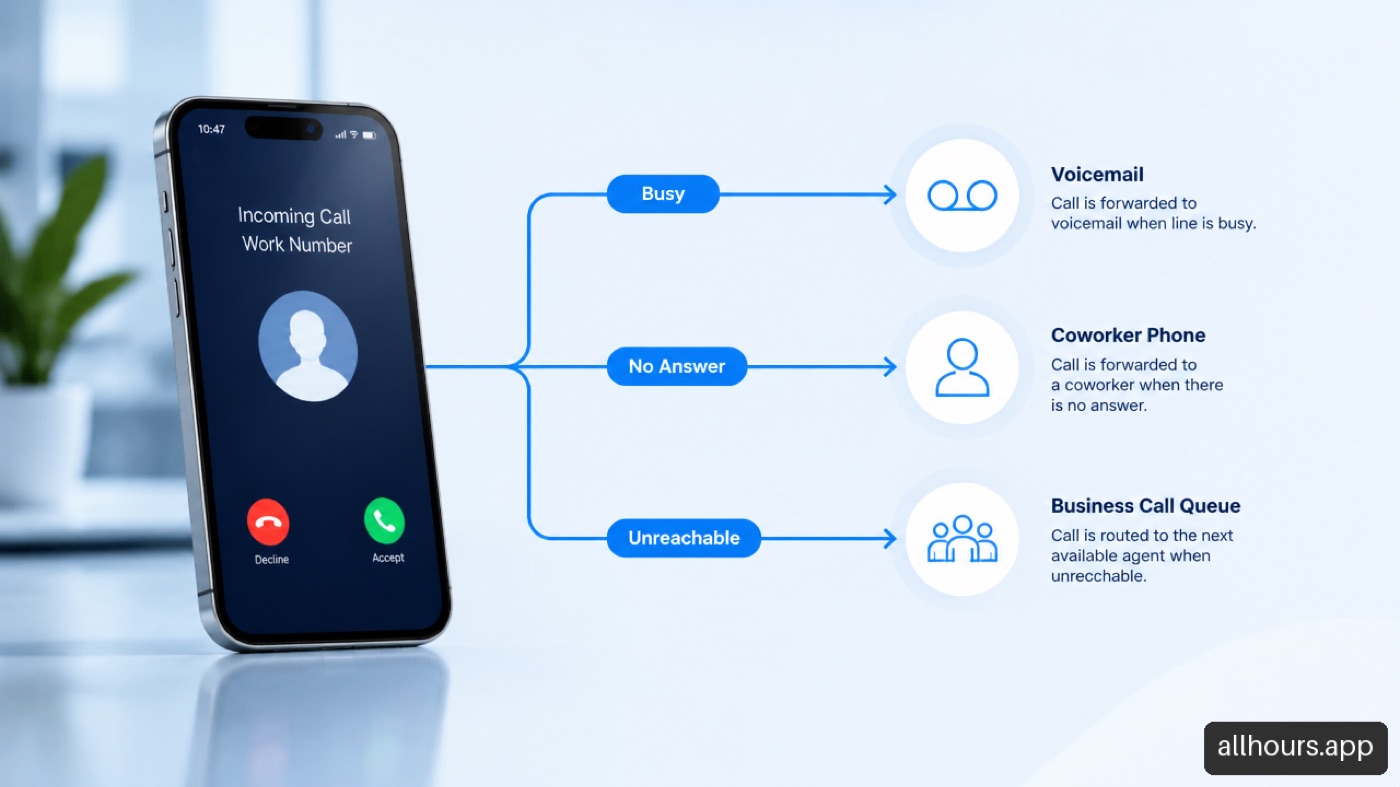
Table Of Contents
- How Conditional Forwarding Works
- Carrier Codes And Setup Paths
- Choosing A Ring Window
- Testing Every Condition
- Troubleshooting And Clean Removal
- Using It For Business Calls
- Frequently Asked Questions
- Sources
How Conditional Forwarding Works
The phone service checks whether a stated condition is true, then routes the call to a destination number. Quo’s explanation of conditional call forwarding describes the usual triggers as busy, no answer, and unreachable.
The Three Conditions
| Condition | What triggers it | Typical use |
|---|---|---|
| Busy | Your line is already on a call, depending on call waiting | Send a second caller to a backup line or team queue |
| No answer | The phone rings past the configured delay | Route unanswered calls to a receptionist instead of voicemail |
| Unreachable | Phone is off, in airplane mode, has no signal, or cannot register | Preserve calls the handset physically cannot receive |
Busy forwarding protects callers while you are speaking with someone else. No-answer forwarding protects callers when you could answer but do not get to the phone in time. Unreachable is the one people misunderstand — it fires on a dead battery, an inactive SIM, or no coverage, and the exact behavior depends on carrier configuration.
Conditional Versus Unconditional
Unconditional forwarding redirects every call immediately; your phone may never ring. Conditional forwarding lets your number ring normally until the condition occurs.
| If you want to… | Better choice | Why |
|---|---|---|
| Take all calls on another line for a week | Unconditional | Every caller goes to the alternate destination |
| Keep normal phone behavior but catch misses | Conditional | Your main phone still rings first |
| Cover a staff member’s lunch break | No answer or busy | Calls move only when the line cannot be handled |
| Keep calls flowing during an outage | Unreachable | Calls route when the device cannot connect |
Use unconditional forwarding when the original line should be out of the call path. Use conditional forwarding when the original line should still get the first chance to answer.
Where The Rule Actually Lives
Conditional forwarding is usually a carrier network feature, not a setting stored on the handset. CallerDesk’s overview of network-level forwarding explains that the network redirects the call after the device cannot answer.
That has a practical consequence: a rule active on the carrier network still works when your phone is off, because the network decides the device is unreachable. An app-based rule may not, if the app cannot connect.
VoIP is different again. A business number may be handled entirely in a provider dashboard with schedules, queues, ring groups, and failover destinations. Smith.ai’s guide to forwarding rules notes these are managed in the provider interface rather than on a handset.
Carrier Codes And Setup Paths
Decide what should happen for each condition first. Do not assume turning on one rule activates all three — most systems require them separately.
Choose The Destination Before You Enable Anything
| Destination | Choose it when | Avoid it when |
|---|---|---|
| Voicemail | You need a record but not an immediate response | Speed decides whether you keep the opportunity |
| Another personal number | A colleague can reliably answer | The backup has no context or permission |
| Business main line | A team can cover coverage gaps | The main line is already overloaded |
| VoIP queue or receptionist | Calls need routing, intake, or scheduling | The setup is overkill for a personal backup |
| Emergency contact path | You need rapid escalation for urgent calls | Every routine caller would land there |
For a personal line, voicemail is usually fine. For a plumber, dental office, or repair company, voicemail is a weak destination when the caller needs an appointment. The cost of missed calls is not one unanswered ring — it includes the next business that answers first.
GSM Star Codes
Most carriers follow the GSM standard. Open your phone’s native dialer — not a VoIP app’s dialer — enter the string, and press call.
| Condition | Activate | Deactivate | Check status |
|---|---|---|---|
| No answer | *61*1[10-digit number]# | ##61# | *#61# |
| Busy | *67*1[10-digit number]# | ##67# | *#67# |
| Unreachable | *62*1[10-digit number]# | ##62# | *#62# |
| All three at once | *004*1[10-digit number]# | ##004# | *#004# |
BubblyPhone’s setup instructions describe the same pattern: dial the feature code, append the destination number, add #, and wait for the confirmation tone or on-screen notice.
Fair warning: codes copied from an unrelated carrier’s guide are a common source of failure, and a code that enables unconditional forwarding will not enable no-answer forwarding. Verify against your own provider.
Carrier Specifics
- AT&T supports the standard GSM codes and also lets you set the ring duration before no-answer forwarding:
**61*1[Number]**[Seconds]#, in 5-second increments from 5 to 30. - T-Mobile uses the universal GSM codes, and
*004*sets all three conditions at once. - Verizon supports GSM commands on modern networks but retains legacy codes —
*71followed by the destination number activates it, and*73cancels. - Comcast, Spectrum, RingCentral, Google Voice, and Ooma are managed in their portals rather than by handset codes.
For RingCentral, Google Voice, and Ooma specifically, check the provider dashboard before changing mobile phone settings. A platform rule can override or duplicate a handset rule. If a RingCentral number already rings a desk phone, mobile app, and queue before forwarding, adding carrier forwarding on the mobile device does nothing to the RingCentral number.
Google Voice has its own trap: when forwarding mobile calls to a Google Voice account, the star code must go into the native cellular dialer, not the Google Voice app dialer. Entering it in the app sends an invalid command to the VoIP server instead of updating your SIM carrier’s network.
Different Rules For Different Conditions
You can usually send each condition somewhere different. For a small electrical contractor:
- Busy goes to the office coordinator, because the technician is already with a customer.
- No answer goes to a scheduling line after a reasonable ring window.
- Unreachable goes to voicemail or an emergency triage line.
Dual-SIM Devices
Running two lines requires care. In Android menus, Supplementary Services shows separate tabs for SIM 1 and SIM 2 — verify the tab before changing numbers. When using star codes, the device sends them on the designated primary voice line; to program the secondary eSIM, switch the active outbound line in the dialer first.
Choosing A Ring Window
No-answer forwarding is based on elapsed time, not a number of rings. Ring length differs by phone model, network, and ringtone, so a caller may hear four rings while the network timer is closer to 20 seconds.
| Situation | Practical approach | Trade-off |
|---|---|---|
| Personal calls | Enough time to reach the phone from another room | Longer waits send urgent callers away |
| Solo field worker | A moderate window while driving or working | Too short forwards calls you could have answered |
| Busy office | Shorter, if a backup team responds immediately | Staff may feel calls transfer too quickly |
| Appointment business | Keep the wait brief when the destination can book | A weak backup makes fast forwarding pointless |
There is no single best number. Start with the time you can realistically answer, then test from another phone. If calls forward just before you pick up, lengthen the delay. If callers hang up first, shorten it or improve the destination — the reasons people hang up will tell you which.
Testing Every Condition
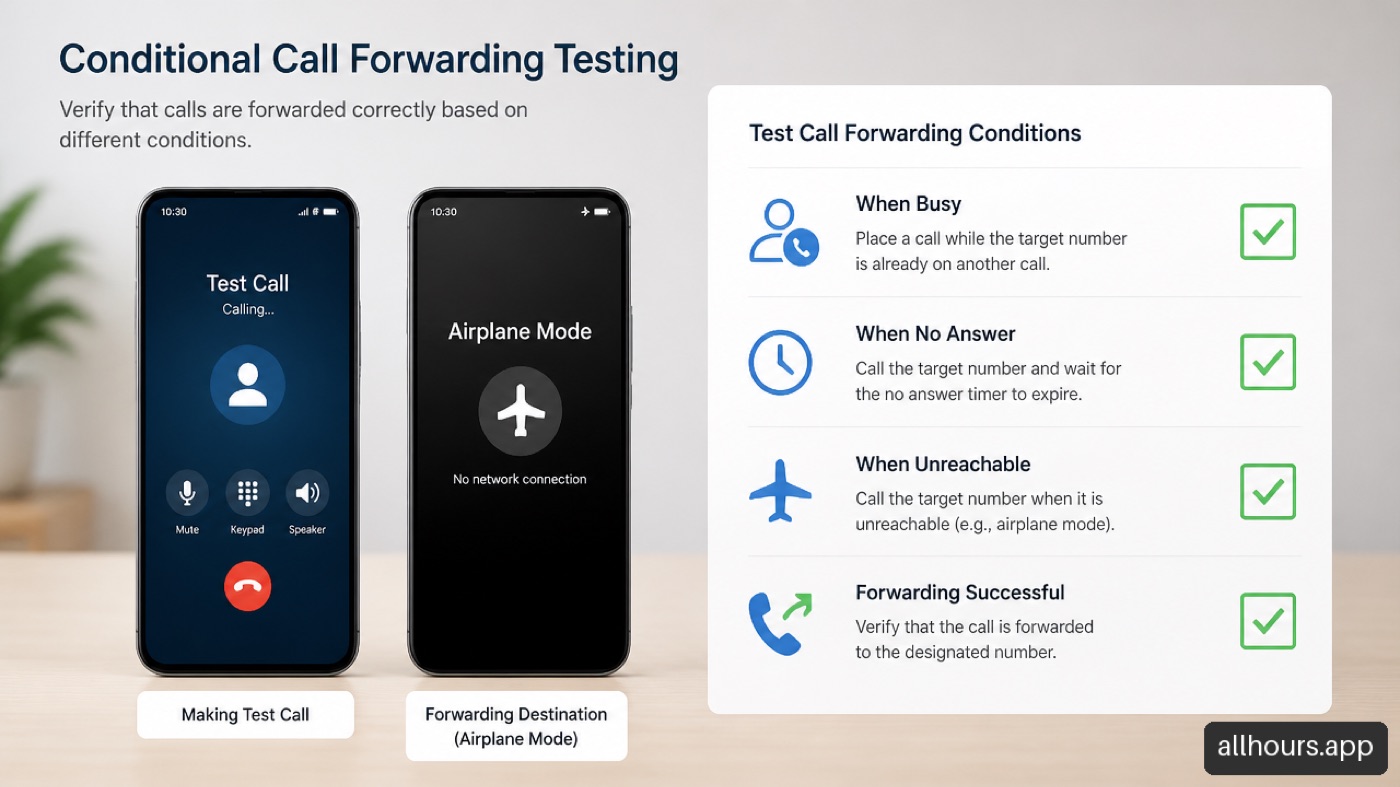
A confirmation message means the code was accepted, not that the rule behaves as you intended. Test each condition separately with a second phone.
- No answer. Call the primary number and let it ring without touching it. Time how long until it forwards.
- Busy. Place an active call on the primary line, then call from the test phone. If call waiting is on, behavior may differ from what you expect. Alternatively, tap Decline on the incoming call.
- Unreachable. Switch the primary device to airplane mode or power it down. Wait 60 seconds for the network to deregister it, then call.
- At the destination, confirm the caller ID, audio quality, and any greeting.
- Review call logs on both the original and destination services. This separates a forwarding failure from a call that never reached the condition.
Troubleshooting And Clean Removal
Calls Land In Carrier Voicemail Instead
This is a timing race. If the carrier’s default voicemail timer cuts in at 15 seconds but your forwarding rule waits 20, voicemail wins. Extend the forwarding trigger, or shorten it using a carrier timer command such as AT&T’s **61* parameter.
MVNO And Prepaid Restrictions
Mobile virtual network operators — Mint, Cricket, Boost, Metro — lease infrastructure from the major carriers and some block supplementary service codes on basic prepaid tiers. If you get “Service not allowed,” “Invalid MMI Code,” or “Feature restricted,” ask support to enable conditional forwarding on your profile, check the web portal for a visual setting, or confirm whether the feature requires a higher plan tier.
Forwarding Loops
A loop happens when Line A forwards unanswered calls to Line B, and Line B forwards unanswered calls back to Line A. The call bounces until the network drops it or the caller gives up.
To prevent it: make sure the destination has its own definitive answering mechanism that picks up before the origin’s timeout resets; stagger the timeouts so the backup answers well inside the primary’s window; and never point two lines conditionally at each other unless one ends in an auto-attendant or answering platform that always picks up.
Undo Rules Cleanly
Turning off a visible toggle is rarely enough — you may have a handset rule, a carrier rule, and a VoIP rule at once.
- Disable the specific busy, no answer, and unreachable rules you created.
- Check for an all-conditions or unconditional rule still active.
- Review voicemail settings; some providers send calls to voicemail before a forwarding rule can run.
- Remove duplicate rules in the business phone dashboard, mobile app, or linked device settings.
- Test again after each change.
A common failure is clearing no-answer forwarding but leaving unreachable active. The phone seems normal until it loses signal, then calls still redirect. That is not a defect — it is an old rule doing exactly what it was configured to do.
Using It For Business Calls
Conditional forwarding is only as valuable as what the destination can do. Forwarding a customer to another unanswered line simply moves the missed call.
For businesses, a destination number is not enough — you need a handoff. If a caller reaches the backup, can that person identify the customer, collect the service address, determine urgency, and offer a next step?
This is where simple forwarding reaches its limit. The limitations of any human receptionist apply to any backup that depends on someone being free at the exact moment a call arrives.
A well-planned business rule looks like this:
- The main number rings the office for a defined window during business hours.
- If nobody answers, the call routes to a backup queue or receptionist service.
- After hours, a separate rule sends routine callers to scheduling and urgent callers to an emergency path.
- The system records the caller’s details and confirms what happens next.
The practical question is not “did we forward the call?” It is “did the caller get help, and did the team receive usable information?” A destination that can book against live availability, capture job details, and escalate genuine emergencies is operationally complete in a way a message-only destination is not.
Frequently Asked Questions
What is conditional call forwarding?
It redirects an incoming call only after a specified condition occurs — a busy line, no answer after a delay, or an unreachable phone. Unconditional forwarding redirects everything immediately.
Does it work when my phone is off?
It can, if unreachable forwarding is configured at the carrier level. The network treats the handset as unreachable and forwards the call. An app-based rule may not work if the device or app is offline.
How many rings before no-answer forwarding starts?
There is no universal ring count — the trigger is a time delay, and providers use different timers. Test from another phone and time it from the first ring.
Can I forward busy, no answer, and unreachable to different numbers?
Often yes, depending on carrier, plan, and VoIP platform. Separate destinations are useful when busy calls should reach a coworker while unreachable calls go to voicemail.
Why is my conditional call forwarding not working?
Check that you enabled the correct condition, entered the destination correctly, and used instructions for your actual provider. Then check for conflicts with voicemail timing, call waiting, a linked app, or an older all-conditions rule. Test each trigger separately.
Can forwarding and voicemail both be active?
Yes, but order of operations matters. A provider may send to voicemail before forwarding, or forward to a destination with its own voicemail. Test what the caller actually hears.
How do I turn it off?
Disable the rule for each active condition in phone settings, the carrier account, dialing codes, or the VoIP portal. Then check for unconditional forwarding and run a test call. Removing one condition does not remove the others.
Sources
- Quo — What Is Conditional Call Forwarding and How to Route Calls: https://www.quo.com/blog/conditional-call-forwarding/
- CallerDesk — What Is Conditional Call Forwarding? How It Works & How to Turn It On: https://callerdesk.io/blog/what-is-conditional-call-forwarding/
- BubblyPhone — Conditional Call Forwarding: Types, Codes & Setup Guide: https://bubblyphone.com/hub/conditional-call-forwarding
- Smith.ai — How To Turn Call Forwarding On & Off and Set Conditional Forwarding Rules: https://smith.ai/blog/how-to-turn-call-forwarding-on-off-and-set-conditional-forwarding-rules
- Airlandline — Conditional Call Forwarding: What Is It and How to Turn It On: https://airlandline.com/pages/conditional-call-forwarding/